


YI Smart
4.086.00 Reviews
App Specs
- Version
- 1.2.4_20260113
- Updated On
- License
- Free
- Downloads
- 100,000+
- Developer
- ZKCam Technology Limited
- Categories
- Video Players & Editors
- Platform
- Android
Screenshots
 Analysis by AppCompare
For a camera app, speed matters most when I want to check what is happening now, not after an alert has gone stale. YI Smart is aimed at keeping a home camera view close at hand, with live video and audio as its central purpose. I see its appeal in the simple routine it supports: open the app, check a familiar space, and decide whether anything needs attention.
What quick checks are good for
A short glance is a more realistic expectation than treating a phone as a dedicated security monitor. When I’m away, I might want to see whether a pet is settled or check a room after hearing a noise. In those moments, an uncluttered route to the live view matters more than a long list of editing tools. YI Smart sits in the video-player and editor category, but its practical value is closer to a remote viewing companion than a general-purpose video editor.
For that reason, I would judge its speed by how quickly it gets me to a useful view and whether the connection stays usable. A live feed depends on the camera, phone, and network all doing their part, so I would not treat any one smooth session as a guarantee that every check will feel instant. If a view takes time to load, waiting a moment and trying again is more sensible than repeatedly tapping controls and making it harder to tell whether the app is responding.
When several checks become a heavier workload
The app’s appeal changes when a quick glance turns into a long monitoring session. Watching live video uses attention as well as a connection, and keeping a feed open while switching between other tasks is less convenient than checking in briefly. I’d use it to answer a specific question, then close the view, rather than leave the phone running as a permanent screen.
That workflow is useful in an everyday situation such as checking on a pet during a break. I’d open the camera, look for a moment, and use audio only if there were a reason to interact. If I needed to keep an eye on multiple rooms for an extended period, a dedicated monitor or a larger screen would be more comfortable than holding a phone. The trade-off is simple: the phone makes remote spot checks convenient, but it is not a substitute for a purpose-built monitoring setup.
Stability, interruptions, and getting back to the view
A remote camera session can be interrupted by a weak connection, a phone switching networks, or ordinary multitasking. I would not assume that a paused or slow feed means the camera has stopped working; first I’d reopen the live view and check whether the connection recovers. That small distinction can prevent unnecessary worry when the goal is simply to confirm what is happening at home.
For reliability, I prefer a routine that does not depend on a single alert. If I’m checking something important, I’d open the camera directly and look at the current scene rather than assume a notification alone gives the full picture. Alerts can help draw attention, but a live check provides context. This is a useful habit with any camera-based app, especially when a brief movement could be ordinary activity rather than a genuine concern.
Worth Reading Before You Choose

Flipboard Shows What News Apps Must Do Beyond the Feed

Switching to Android Auto Means Rethinking Your Driving Routine

Google Calendar Makes a Crowded Week Easier to Manage

Ludo King Makes the Most of the Minutes Between Plans

Baby Panda World Brings Quick Play to Modern Phones, but Its Game Library Feels Busy

ESPN’s Live Game View Makes Following Close Games Easier
YI Smart is developed by ZKCam Technology Limited and is free to install, with in-app purchases ranging from $2.99 to $129.99 per item. Its average rating is 4.1 from around 1.1K ratings, and it has over 100K installs. Those figures suggest that it has found an audience, but they don’t tell me whether it fits a particular home or camera setup. I’d base that decision on the kind of checks I expect to make and how much I value having a phone-based view.
Getting Started with YI Smart
First things first, downloading and setting up YI Smart is a breeze. Available on both Android and iOS, you can grab it from the Google Play Store or Apple App Store. Once installed, you'll need to create an account, which is super straightforward. They ask for the usual – email, password, and you’re in!
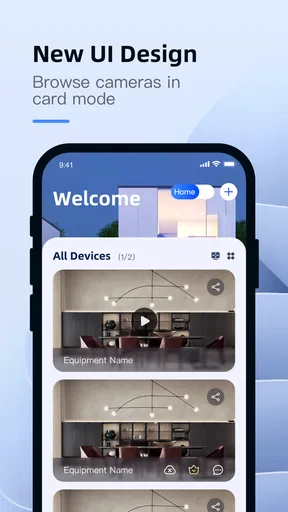
The app's interface is clean and user-friendly, which is a big plus. You don’t need to be tech-savvy to navigate through its features. The home screen gives you a quick overview of all your connected devices, and adding new cameras is as easy as pie. Just hit the '+' button, follow the prompts, and voila, you're ready to roll.
Features That Stand Out
So, what exactly does YI Smart bring to the table? Quite a bit, actually. Let's break down some of the features that caught my eye:
- Live Streaming: You can watch real-time footage from your cameras right on your phone. It's smooth and the video quality is impressive, even in low light.
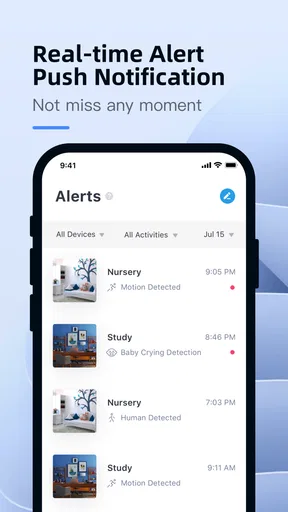
- Motion Detection: The app sends alerts whenever it detects movement. It's like having a pair of eyes that never sleep.
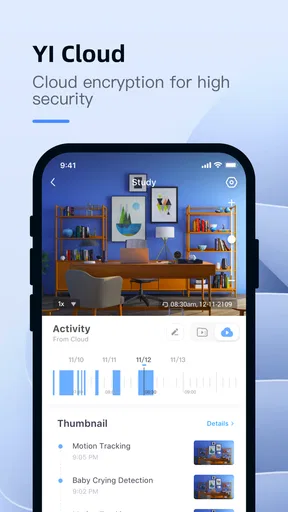
- Cloud Storage: Store your videos in the cloud, ensuring you never lose important footage. Plus, you can access them from anywhere.
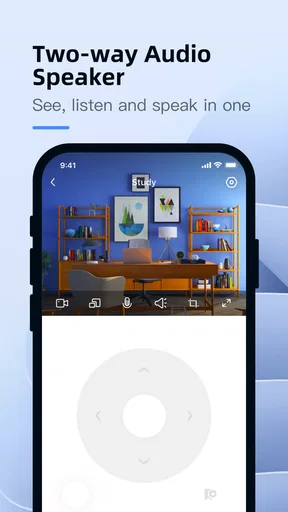
- Two-Way Audio: Want to scare off an intruder or just say hi to your pets? The two-way audio feature lets you do just that.
Performance and Reliability
In terms of performance, YI Smart does not disappoint. The app runs smoothly without any noticeable lag, and the alerts are timely. I tested it under various conditions, and the connection remained stable, which is crucial for a security app. The motion detection is sensitive enough to catch even the slightest movement, but you can adjust the sensitivity if you're getting too many notifications.
One thing I really appreciated is how responsive the customer support is. I had a minor issue setting up one of the cameras, and their support team was quick to help me out. It’s always reassuring to know help is just a call or email away.
Security and Privacy
When it comes to security, YI Smart takes it seriously. The app uses end-to-end encryption, ensuring your data is safe from prying eyes. They also have a privacy mode, which is a nifty feature if you want to stop recording without having to disconnect the camera completely.
However, like any app that uses cloud storage, there’s always a lingering question about data privacy. It's worth reading through their privacy policy to get a full picture of how your data is handled.
Choosing it over other video options
Compared with a general video player, this app is built around remote camera viewing rather than browsing a library of films or trimming clips. That focus is valuable if I want to check a room or communicate through a camera, but it makes YI Smart a poor fit for someone who mainly wants to edit recordings or watch locally stored media. In those cases, a conventional player or editor is the more direct tool.
It also differs from a basic camera monitor in the way the experience combines viewing, alerts, and audio. The benefit is having several home-checking tasks in one place; the trade-off is that camera-dependent features are only useful when the relevant equipment and connection are working together. Before making it part of a daily routine, I’d confirm that the cameras I intend to use are supported and that the live view is dependable from the places where I usually check in.
Device fit and practical limits
The app requires Android 7.0 or later, and its age rating is Everyone. For an older phone, the minimum operating-system requirement is a useful first check before installing. Even on a compatible device, keeping a live feed open for a long stretch is likely to be less convenient than brief visits, since video viewing naturally occupies the screen and draws on the phone’s resources. I’d avoid treating the app as a background surveillance display when a quick check is all I need.
A small but useful habit is to give each check a purpose: confirm a room is clear, see whether a pet is nearby, or speak briefly through two-way audio. That keeps the session focused and makes it easier to notice whether a feed has frozen or simply shows a still scene. For motion alerts, adjusting sensitivity thoughtfully can also reduce the distraction of notifications that don’t require action, while retaining alerts that matter to the household.
The current version is 1.2.4_20260113, and the app was released on Dec 18, 2023. I’d keep it updated through the platform’s normal app-update process, particularly if I rely on it for regular camera checks. An update is not a promise that every connection issue will disappear, but using a current version is a sensible first step when troubleshooting unexpected behavior.
Who will get the most from it
I’d recommend this kind of setup to someone who already has compatible cameras and wants a straightforward way to check home from a phone. It makes particular sense for people who value occasional remote viewing, want to see a pet during the day, or need a convenient way to speak through a camera. It is less suited to someone shopping for a standalone video editor, someone who needs continuous professional monitoring, or anyone who does not want to depend on a camera-and-phone connection.
If a feed fails to appear, I’d start with the simplest recovery steps: check the phone’s connection, close and reopen the live view, and confirm the camera is available. If the issue continues, the app’s support route may be worth trying, especially during initial setup. I would not rely on a camera app as the only response to an urgent safety issue; it is better used as a way to check in than as a guarantee that someone will always see an alert immediately.
Final Thoughts
All in all, YI Smart is a solid choice for anyone looking to amp up their home security. The app is feature-rich, reliable, and easy to use. While there are some privacy concerns to consider, the benefits of having a cloud-based security system are hard to ignore.
If you're in the market for a security app that won't break the bank but offers top-notch features, give YI Smart a try. It just might be the peace of mind you've been searching for.
Pros
- User-friendly interface for easy navigation.
- High-quality video and image capture.
- Real-time alerts for enhanced security.
- Simple setup with step-by-step guide.
- Wide-angle lens covers more area.
Cons
- Requires stable internet for optimal use.
- Limited free cloud storage options.
- Occasional connectivity issues reported.
- Some features locked behind paywall.
- App updates can be infrequent.
FAQs for YI Smart
What features does the YI Smart app offer?
The YI Smart app provides a range of features designed to enhance your security and convenience. It includes real-time video streaming, motion detection alerts, two-way audio communication, and cloud storage options. The app also allows for remote control of your YI devices, ensuring you can monitor your home or office anytime, anywhere.
Is the YI Smart app compatible with all devices?
The YI Smart app is compatible with both Android and iOS devices. It supports a wide range of YI cameras and smart devices. However, it's important to check the specific model compatibility on the app's download page or the manufacturer's website to ensure full functionality with your devices.
How secure is the YI Smart app?
Security is a top priority for the YI Smart app. It employs advanced encryption protocols to ensure your data is protected. The app also offers optional two-factor authentication for an added layer of security. Regular updates are provided to address any vulnerabilities and enhance overall user protection.
Does the YI Smart app require a subscription?
While the YI Smart app itself is free to download, some features, such as extended cloud storage, may require a subscription. The app offers both free and paid plans, allowing users to choose based on their needs for video storage and additional capabilities.
How user-friendly is the YI Smart app?
The YI Smart app is designed with user-friendliness in mind. Its intuitive interface makes it easy to set up and navigate, even for those not tech-savvy. The app includes a detailed tutorial for new users and offers customer support for any issues that may arise, ensuring a smooth user experience.


